

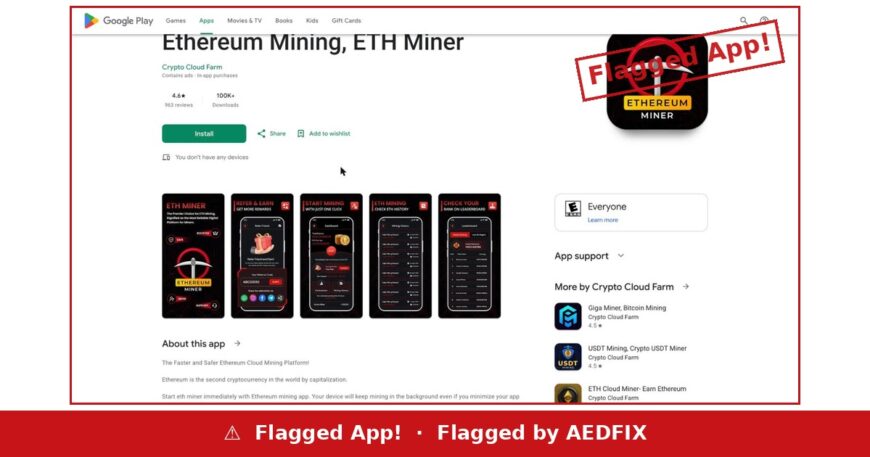
Verdict up front: two sentences in this app’s own store description contradict each other outright. One says your phone keeps mining while the screen is locked. The next says the app never uses your phone to mine at all. Both cannot be true, and the reviews suggest neither is what actually happens.
Ethereum Mining, ETH Miner is published on Google Play by Crypto Cloud Farm. On the day we checked it showed 4.6 stars from 963 reviews and 100,000+ downloads. The listing carries ads and in-app purchases.
The contradiction
These two claims appear within a few lines of each other in the same description:
Claim one
“Start eth miner immediately with Ethereum mining app. Your device will keep mining in the background even if you minimize your app and lock the phone.”
Claim two
“Our app never uses a device’s CPU or GPU for cryptocurrency mining operations and not run unrelated background processes.”
A phone cannot both be mining in the background and not be using its processor. One of those sentences is there to make the app sound like it works. The other is there to satisfy Google’s policy on on-device mining, which Play has restricted for years.
The listing does not resolve the conflict. It simply contains both.
What the withdrawal actually requires
The clearest account of the payout mechanic comes from a reviewer named Kurt Cramer, dated 29 March 2026. Twenty people marked it helpful.
“This app doesn’t let you withdraw your earnings unless you go through hoops, referring ‘friends’, then wait for them to accept (if they do), then wait for them to mine (if they do). You spend hours watching ads to mine so, they get their revenue.”
Note what that describes. The balance on screen is not held back by a fee or a threshold you could reach by waiting. It is held back until you recruit other people, and until those people also perform. Your payout depends on strangers doing something you cannot control.
Meanwhile the ads run. That part does not depend on anyone.
A second reviewer, Ajibola D., wrote in June 2025 about paying for a tier that did not function: “I bought the basic, it didn’t load… for 20 out of the 24 hr period, the balance reads zero.”
One developer, several currencies
This is not a standalone app. Crypto Cloud Farm’s own “More by this developer” panel on the listing shows a portfolio running across several coins — USDT Mining, Crypto USDT Miner at 500,000+ installs, ETH Cloud Miner — Earn Ethereum at 100,000+, and Giga Miner, Bitcoin Mining.
The wrapper changes with the currency. The mechanic does not.
How to read a mining app listing
- Look for the policy sentence. “Does not use your CPU or GPU” is written for Google, not for you. If the same page also promises background mining, the two claims are aimed at different readers.
- Find out what unlocks the withdrawal. If the answer is “recruit people”, the product is recruitment.
- Count the ads against the payout. Hours of watched ads produce certain revenue for the developer and uncertain credit for you.
- Check the developer’s other apps. A single app is an app. Four of them across four currencies is a template.
Nothing here requires you to take our word for it. Open the listing, read the description to the end, and read the one-star reviews before the five-star average. Everything above is on the page.
If you have already paid
Cancel through Google Play rather than inside the app, and ask Google for a refund. Screenshot your receipts and the review thread before anything changes. If money left your account and nothing came back, report it at IC3.gov — reporting is free, and no legitimate service asks you to pay before your money is returned.

